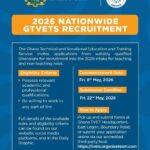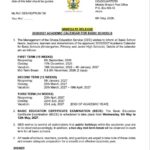



The 2026 teacher recruitment exercise of the Ghana Education Service has attracted significant attention from graduates seeking employment in public schools across the country.
As applicants prepare to begin the process and others already done, it is important to understand the correct procedure for accessing and completing the online application.
Accessing the Recruitment Portal
Applicants are required to follow the official recruitment link provided for the exercise and begin the registration process through the portal
The official link is https://bit.ly/GESteacherrecruitment2026
How To Apply
- Read the Eligibility Requirements carefully.
- After reading the requirements, click on Apply Now
- To create an account, click the Sign-Up option.
Enter the following details to get your Application ID:
- Ghana Card ID
- Email Address
- Mobile number
NOTE. Copy the Application ID generated and log in to start your application. (This is very important)
- Fill in all your personal details and upload all the Required Documents
- Review the details carefully.
- Submit the form.
- Print the Confirmation Slip.
Graduates (University) Applicants
Academic Qualification
- Hold a recognised related degree in education from an accredited tertiary institution.
- Completed all academic and teaching practice requirements
- NATIONAL SERVICE
- Completed National Service.
- Possess a valid National Service Certificate.
- TEACHER LICENSURE
- Passed the Ghana Teacher Licensure Examination (NTC)
- Hold a valid NTC Teacher Licensure Certificate
Required Documents
- Academic Certificate
- Licensure Certificate
- National Service Cert
- Ghana Card
- SSNIT Number
- Passport Photograph
- Birth Certificate
Graduates (College of Education)
Academic Qualification
- Completed a Bachelor of Education (B.Ed.) from an accredited College of Education
- Completed all academic and teaching practice requirements
- Completed National Service.
- Possess a valid National Service Certificate.
- Passed the Ghana Teacher Licensure Examination conducted by the NTC
- Hold a valid NTC Teacher Licensure Certificate
Required Documents
- Academic Certificate
- Licensure Certificate
- National Service Cert
- Ghana Card
- SSNIT Number
- Passport Photograph
- Birth Certificate
Diploma Applicants
Academic Qualification
- Possess a Diploma in Basic Education (DBE) or a recognised education-related diploma from an accredited institution
- Completed all teaching practice.
- Completed National Service.
- Possess a valid National Service Certificate.
- Passed the Ghana Teacher Licensure Examination conducted by the NTC
- Hold a valid NTC Teacher Licensure Certificate
Required Documents
- Academic Certificate
- Licensure Certificate
- National Service Cert
- Ghana Card
- SSNIT Number
- Passport Photograph
- Birth Certificate
Failure to keep the Application ID may lead to serious difficulties, including:
- Inability to log in again to the portal
- Inability to check application status
- Inability to re-register using the same Ghana Card number
For safety, applicants should take a screenshot of the Application ID or write it down and store it in a secure location.
What to Do If You Did Not Save Your Application ID
Under normal circumstances, recruitment systems send the Application ID to the email address or phone number provided during registration.
Applicants who did not save their ID are advised to:
- Check their email inbox carefully.
- Check the Spam or Junk folder, where automated messages sometimes appear.
However, reports from several applicants indicate that some users are not currently receiving the Application ID through email or SMS.
This appears to be affecting many applicants and may be related to heavy system traffic.
Absence of “Forgot ID” Feature
In most online application systems, applicants can retrieve their login details through a “Forgot ID” or “Forgot Password” feature.
At the moment, the current recruitment portal does not provide such a recovery option.
This makes it even more important for applicants to save their Application ID when it is first generated.
System Traffic and “Save Fail” Messages
- Some applicants may encounter a “Save Fail” notification while using the portal.
- This usually happens when a very large number of users attempt to access the platform at the same time.
- High traffic on the system can slow down processing and temporarily prevent certain actions from completing successfully.
- Applicants experiencing this problem are advised to remain patient and try again after some time.
Advice to Applicants
- The Ghana Education Service recruitment process requires careful attention at every stage.
- Applicants are encouraged to proceed slowly and verify each step before moving forward.
What are your experiences so far?
For General Informations, Schorlaships, Intenships, Jobs, Research Grants, and Many More Both Local and International;
-
Follow to join WhatsApp Channel.
-
Telegram Channel.